Built for the Future of Heads-Up Operations
When a technician, operator, or field worker looks at a piece of equipment, a part, a permit, or a work order, Ripplemesh surfaces the right information immediately — no keyboard, no phone unlock, no searching. Every QR code in Ripplemesh resolves to a structured, role-based record card designed for fast reading and action on wearable optics including Apple Smart Glasses.
- QR codes are embedded in every asset, part, work order, permit, and credential record
- Scanning opens a purpose-built record card with the most relevant data at the top
- Cards are designed for small viewports, high contrast, and minimal interaction
- Records are role-aware — what a technician sees differs from what an inspector sees
- No additional configuration required — QR and scan infrastructure is live today
QR Codes Across Every Critical Operational Domain
Ripplemesh implements a unified QR scanning architecture across the entire platform. Every scan routes to a live, authenticated record — not a static document or a PDF.
Parts & Inventory
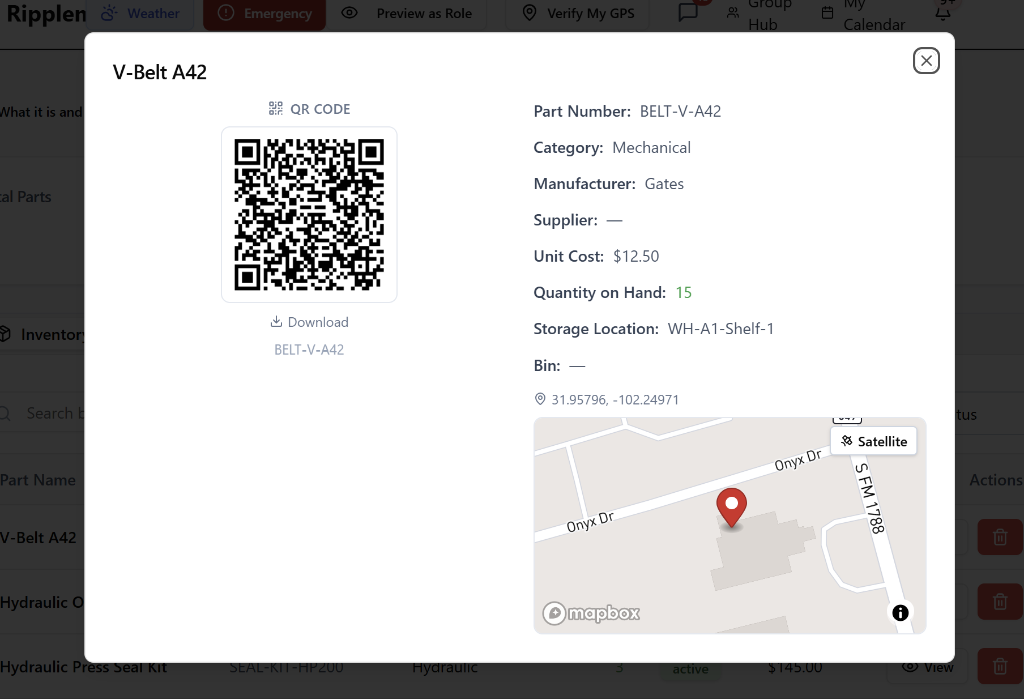
Scan a part bin or shelf label to see quantity on hand, availability, storage location, hazmat status, and reorder point.
Plant & Equipment
Each asset links to its full operational record including status, maintenance history, warranty, and reliability metrics (MTBF/MTTR).
Work Orders
Scan a job pack to see assigned technician, priority, required parts, safety precautions, and current status. Enables fully paperless field operations.
LOTO Plans
Scan a lockout/tagout plan to verify the authorized isolation certificate, energy source list, and isolation steps.
Access Permits & Permits to Work
Scan to confirm validity, authorized personnel, expiry, and associated safety requirements.
Worker Credentials & Certifications
Each credential card carries a QR code that resolves to the verified record — name, qualification, issue date, expiry, and issuing authority.
Personnel
Worker QR badges resolve to role, department, active qualifications, and emergency contact information.
SOP Evidence Architecture
From Heads-Up Records to Heads-Up Procedure Verification
Ripplemesh connects heads-up record access with SOP execution, evidence capture, and AI-assisted drift correction. It is not only ready to display records through QR-enabled, smart-glasses-friendly views — it is also building the evidence model required for hands-free procedure verification. A worker can open the asset, work order, permit, LOTO plan, or SOP, follow the approved step sequence, and capture visual evidence tied directly to the procedure.
One Scan. Live Data. No App Required.
Internal App Mode
When scanned by an authenticated Ripplemesh user — via mobile or Apple Smart Glasses — the QR opens the live record card inside the platform. The record is always current. The user sees role-appropriate information only.
- Live data — always current, never cached
- Role-filtered — workers see what matters to their task
- Optimized for small viewports and glanceable reading
Public Verification Mode
Certificate and credential QR codes also resolve via verification.ripplemesh.com — a public-facing verification portal. External parties such as clients, auditors, and regulators can confirm credential validity without a Ripplemesh account.
- No Ripplemesh account required for external verification
- Auditors, clients, and regulators can self-serve
- Live status — expired credentials show as expired
Security note: Internal QR records require a valid Ripplemesh session. Unauthenticated scans are redirected to sign-in and returned to the record after login.
The Enterprise Is Going Hands-Free
Apple's forthcoming Smart Glasses hardware represents a fundamental shift in how field workers and operational staff interact with enterprise systems. Ripplemesh is positioned to be natively compatible with this transition today.
Record cards are built for fast reading, not dense data grids
QR infrastructure is live now — no development backlog
Mobile-first, glance-readable layouts already in production
Role-based filtering ensures workers only see what is relevant to their task
Operations, learning, safety, maintenance, and HR are all connected in one scannable environment
Organizations deploying Ripplemesh today are building the foundation for a fully augmented operations environment tomorrow.